


 This is a MaxForLive device, so it only works in Live Suite or Live Standard with MaxForLive.
 Compatible with Push3 Standalone!
Workflow utility
Push 3 standalone compatible
Elisabeth Homeland
Varispeed
€20,00
/
Couldn't load pickup availability
Varispeed is a MaxForLive device that allows you to transpose your entire Live set in Ableton Live.
Similar to the Varispeed option in analog tape machines and DAWs like Logic pro.
It transposes all Audio/MIDI clips in both Session and Arrangement View by up to -24/+24 semitones while accurately changing the Live Set’s tempo.
It can also automatically transpose:
- The Root Note of individual Audio, and MIDI clips, and your Live Set.
- Simpler devices in Slicing mode, and Serato Sample plugins
- AutoTune plugins - Antares, Waves, Nectar, MetaTune, Melda, Melodyne, Xpitch, and AutoTuna - (AutoShift is also compatible)
- Certain Antares effects/Instruments. (EFX, Slice, Harmony Engine, Vocodist)
- A few other built in Ableton Live and M4L devices. (Like Shifter, Corpus, and Resonators)
- You can also Transpose MIDI information after leaving clips such as sequencer and chord generator outputs or individual Drum Rack cells (see VPitch section for details).
Exclude specific tracks like drums, or DrumRacks. by adding a keyword or symbol to their names, keeping their MIDI and audio clips untouched in your Live Set (See Exclude section for Details).
This gives you the ability to explore your song in a different key, and record parts in different speed and pitch with one click.
Varispeed is not a real-time audio effect. It has to manually change parameter values in order to transpose your Live set.
Compatibility:
| Ableton | Live 11, Live 12, |
|---|---|
| System | Mac, Windows, |

Transpose everything
Varispeed can transpose all your Audio / Midi clips throughout your whole Live set up to -24/+24 semitones.

Root Note
In Live 12 you can transpose the "Root Note" of Audio and MIDI clips to take advantage the new scale awareness features in Live.

Exclude tracks
You can exclude certain tracks from the transposition, like Drums, and Atonal elements, with a track name based filter system.

AutoTune and plugins
Varispeed can also transpose certain plugins Like AutoTune, so you don't have to manually change their scale.

Simpler and Serato
You can use Varispeed to transpose your Chops in Simpler and Serato sample.

-
+/- buttons: Transpose your project by one semitone.
-
Main Knob: Transpose your project by up to -24/+24 semitones (two octaves).
-
Tempo Circuit: Turn the tempo-changing circuit on or off.
-
Root Note Circuit: Turn the root note–changing circuit on or off.
-
Transposition Location: Decide whether to transpose audio/MIDI clips in Session View, Arrangement View, or both.
-
Advanced Settings: Expand the device to access advanced settings.
-
Exclude Tracks: Prevent transposition of tracks whose names contain any words or symbols entered in the box.
-
Plug-in/Device Transposition: Transpose the key parameter of all plug-in or device instances in your Live set that are enabled in this section.
Note:
You can only change most parameters when Varispeed is in the 0 position to prevent messing up your Live set.
To change any setting, first set Varispeed to 0, then tweak the desired parameters.
All parameters (except the Exclude symbols) are accessible from Push (1, 2, 3, and standalone).

Main controls to transpose your whole project by up to +/- 24 semitones.
Recommended usage: between -12 and +12 to avoid pushing clips or plug-in parameters out of range.
Use extreme values only for experimental purposes.

When enabled, Varispeed accurately changes your Live set’s tempo when you transpose your Live set, just like an analog tape machine would.
When Varispeed is in the 0 position, it logs your tempo as a starting point.
If you want to permanently change this tempo, ensure Varispeed is set to 0; otherwise, Varispeed will revert it back to the original tempo.
Note: When transposition with Melodyne enabled is active, the tempo change option will be automatically disabled to prevent unexpected behavior in Melodyne instances.

When activated, Varispeed will transpose the Root Note of all MIDI and audio clips, as well as your project’s key in your Live set.
This enables you to use the new Scale Mode feature in Live 12 in combination with Varispeed.
In Live 11, this is only useful if you have enabled Scale Mode in a MIDI clip.
If so, Varispeed will change it, and the pads on Push will reflect that change.
Note:
Currently, accessing this parameter via the API is not optimal, which may result in longer transposition times for your Live set when this feature is enabled.
Hopefully, this will change with a future Live update.

Decide whether to transpose audio/MIDI clips in Session View, Arrangement View, or both.

You may have tracks with either MIDI or audio clips in your project that you don’t want to transpose, such as:
- audio tracks with drum and percussion samples
- MIDI tracks with a Drum Rack
- MIDI tracks that contain MIDI generator tools or sequencers
- Simpler devices in Slicing mode
- Serato Sample plug-ins
- and so on
With the exclude feature, you can prevent the transposition of any track’s audio or MIDI clips if the track name contains any of the keywords or symbols you’ve entered in the box.
For example, if you have a MIDI track with a Drum Rack called “16 Snares,” the notes in its MIDI clips won’t be affected by Varispeed because the track name contains the word “snare.”

So it continues to trigger the correct cells or samples after you transpose your project.
These keywords or symbols are not case-sensitive, and they can appear anywhere in the track’s name. So if you have a keyword “tom,” it will exclude all tracks that are named like: tom, TOM, Toms, Tomato, and so on.
Note:
You can still transpose individual Drum Rack cells. More info about that in the Vpitch section later.
Simpler

By default, Varispeed transposes the Transpose parameter of all your Simpler devices in Slicing mode to keep them in key with the rest of your song.
It’s important to use one of the exclude signs in the MIDI track’s name; otherwise, both the notes in the MIDI clips and the Simpler device pitch will be transposed
(although this can lead to interesting experiments).


If you place the MIDI effect device “Pitch” (that comes with Live) into a MIDI track and rename it to “VPitch” (case-sensitive), Varispeed will transpose it if this option is enabled.
This allows you to transpose signals coming from MIDI-generating devices like sequencers and chord generators.
You can even transpose separate Drum Rack cells that contain melodic samples by placing a VPitch device before the cell’s instrument.


To use the VPitch device, you need to have an exclude sign in the track’s name; otherwise, both the notes of the MIDI clips on the track and the MIDI information coming out of the VPitch device will be transposed.

Varispeed can transpose the Key parameter of all Serato Sample plug-ins in your project.

Note: It only works if the “Source…Offset” parameter is visible in Live. Click the “Configure” button, then press the “Key” parameter.

If you save it as a plug-in default preset, you won’t have to repeat this process when you load a Serato Sample plug-in in any of your new Live sets.
I also created a project that includes all the plug-ins Varispeed is capable of transposing, with the required parameters already visible. All you need to do is open this Live set and save the plug-ins as “Default Configuration.”

Varispeed can transpose the Key/Scale parameter of all Auto-Tune plug-ins in your project.

The supported plug-ins are:
- Antares Auto-Tune (Access, Artist, Pro)
- Waves Tune Real-Time
- Nectar (3, 4, and the Pitch plug-in)
- MetaTune
- Melda MAutoPitch
- Melodyne
- AutoTuna
- Xpitch
And of course, the built-in AutoShift works too without enabling anything. : )

Some notes for specific Auto-Tune plug-ins:
- Antares Auto-Tune (Access, Artist, Pro):
Different versions of Auto-Tune are built differently and require different methods to transpose them.
There’s a list to choose the behavior that fits your instances:

If you’re using the latest Antares versions, use Auto-Tune A.
If you’re using either an older version or a UAD one, choose between Auto-Tune B or C mode
(depending on which flavor or version you’re using—check how it reacts to Varispeed to decide which one works for your plug-in).
- Waves Tune Real-Time:
The AU and VST/VST3 versions are built differently and require different methods to transpose them. Choose your format from the list.
- iZotope Nectar (3, 4, and Pitch):
The AU and VST/VST3 versions are built differently and require different methods to transpose them. Choose your format from the list.
- Melodyne:
Since there’s no ARA implementation in Live 11 and 12 (yet), when you change your project’s tempo,
Melodyne can’t follow it correctly and will play the audio from its timeline in the wrong position.
To prevent this, when you enable Melodyne transposition, the Tempo circuit of Varispeed will be automatically disabled.
Note:
Varispeed can only transpose these plug-ins if their Key parameter is visible in Live.
Check the Serato section to see how to configure them.
Varispeed can transpose the Key/Scale parameter of some Antares effect/instrument plug-ins in your project:

The supported plug-ins are:

- EFX (EFX+)
- Slice
- Harmony Engine
- Vocodist
Note:
Varispeed can only transpose these plug-ins if their Key parameter is visible in Live.
Check the Serato section to see how to configure them.
Varispeed is capable of transposing certain pitch- or coarse-related parameters of Live effects and Max for Live devices.

This functionality can be useful for specific experimental use cases. You can enable or disable this feature per device in the Advanced menu (all options are turned off by default).
-
Shifter
If enabled, the Coarse parameter will be transposed when using Varispeed.
-
SpectralResonator
If enabled, the Freq (Note) parameter will be transposed when using Varispeed.
-
Resonators

If enabled, the Note and the four Pitch parameters will be transposed when using Varispeed. -
Corpus

If enabled, the Tune parameter will be transposed when using Varispeed. -
PitchHack

If enabled, the Coarse parameter will be transposed when using Varispeed. -
PitchLoop89
If enabled, the Pitch Left / Right parameters will be transposed when using Varispeed.
Limitations:
-
Varispeed is not a real-time audio effect. It has to manually change parameter values in order to transpose your Live set.
If you have a larger Live set with a lot of audio/MIDI clips and plug-ins, it can take a few seconds to transpose everything. - The smallest amount of transposition Varispeed can apply is 1 semitone.
- Varispeed cannot transpose frozen tracks. It is recommended to duplicate the frozen track, flatten one of them, and mute the frozen one when using the device.
Notifications, restrictions:
Varispeed provides notifications and restrictions in certain situations:
-
Tempo Range Limit:

Ableton Live has a default tempo range that cannot be exceeded. The slowest tempo is 20 BPM, and the fastest is 999 BPM.
If the Tempo option is enabled and the Live set’s tempo would go out of range due to transposition (less than 20 BPM or more than 999 BPM), the knob’s range is automatically limited to prevent this.
When this happens, a red dot will appear with the value of the minimum or maximum amount of transposition Varispeed can apply.
This limitation depends on your original tempo:
For example, if your original tempo is 38 BPM, you won’t be able to turn Varispeed below -11.
If your original tempo falls between 80 BPM and 250 BPM, you can freely adjust the tempo in both directions.
This limitation depends on your original tempo:
For example, if your original tempo is 38 BPM, you won’t be able to turn Varispeed below -11.
If your original tempo falls between 80 BPM and 250 BPM, you can freely adjust the tempo in both directions.
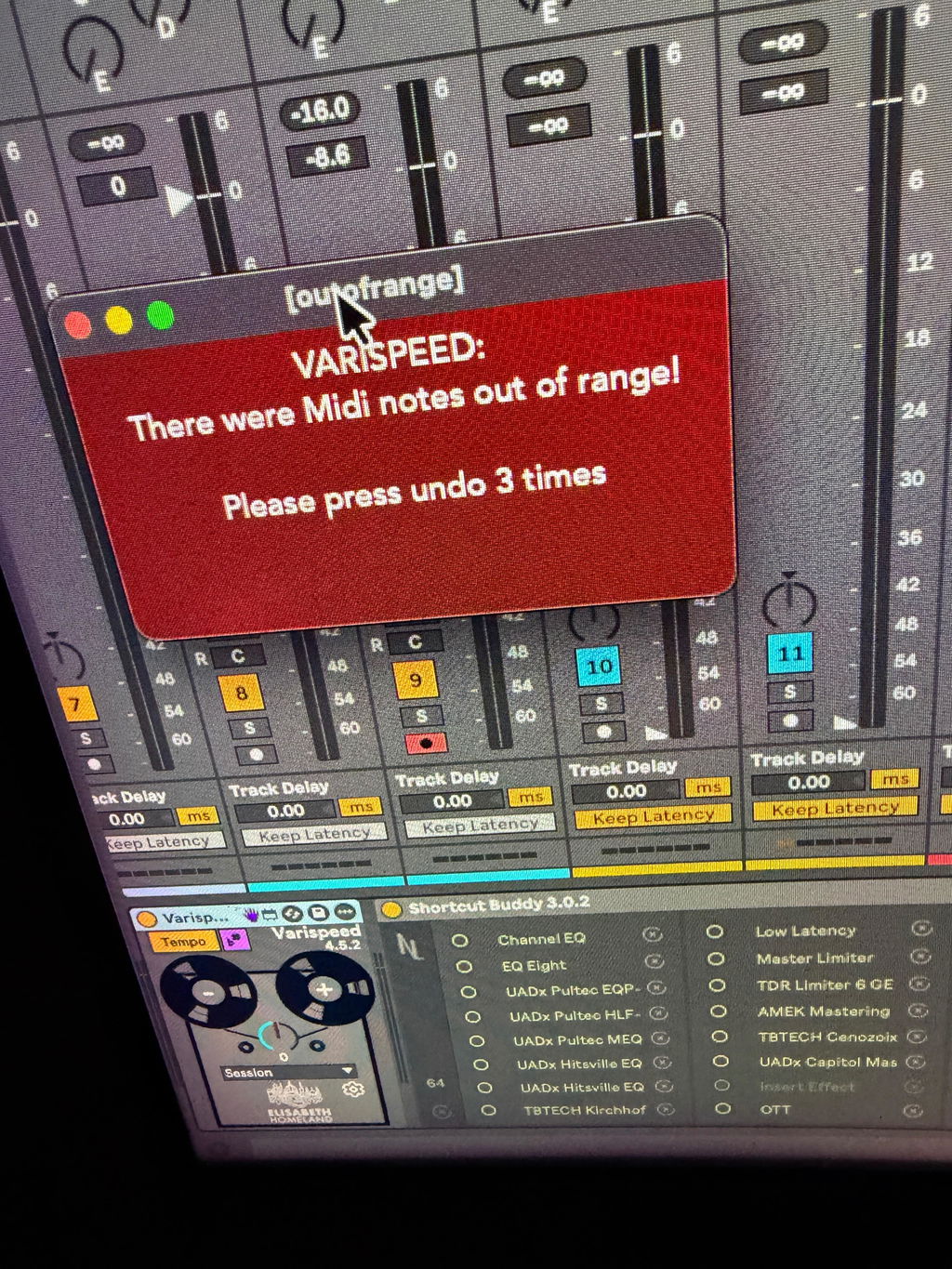
MIDI Note Range Limit:

If your project contains very low or very high MIDI notes, attempting to apply changes that hit the limits (0 or 127) will trigger a pop-up window from Varispeed, instructing you to revert the last change.
If your project contains very low or very high MIDI notes, attempting to apply changes that hit the limits (0 or 127) will trigger a pop-up window from Varispeed, instructing you to revert the last change.
- Place the devices in your Ableton Live User Library.
-
Default User Library locations:
- Windows: \Users\[username]\Documents\Ableton\User Library
- Mac: Macintosh HD/Users/[username]/Music/Ableton/User Library
- Live needs to analyze your User Library after adding devices. This process may take some time. In the meantime, you can drag and drop the devices from your User Library onto your tracks.
Please Note:
- For plug-ins like Auto-Tune and Serato, Varispeed needs access to certain parameters in order to control them.
- The download includes a project called “Vari Save Default Plug-ins Project.”
- Save the plug-ins from this project as “Default Configuration” so Varispeed can access the Key/Note parameters every time you load the plug-ins into a Live set.

Version 4.5.2 - 2026.07.15.
-
Live 12.4.3 changed the timing of when some parameters output their values during Max for Live device initialization. This caused the device to create an unnecessary Undo history step immediately after being loaded into a Live Set. This update fixes the issue.
Version 4.5.1 - 2026.04.24.
- Stability improvements.
-
Due to a change on the website previous versions can no longer check for new updates. - This version solves the issue.
Version 4.5 - 2026.01.11.
- Slightly Modernized-Updated interface.
- Updated User manual.
Varispeed 4.4 - 2025.11.11.
- Added support for Auto-Tune 2026 (Set the device to "Autotune A" mode)
- Fixed support for the AU version of Auto-Tune Slice, and Vocalist. (Vst3 version works too of course!)
- Updated the "update checker" to the new 2.0 version. it should inform you about updates more reliably in the future.
Varispeed 4.3.2 - 2025.10.03.
- Fixed a text display issue under the Exclude sign box that was present in some Windows systems.
Varispeed 4.3.1 - 2025.02.11.
- Fixed an issue that prevented the transposing of the clips in Live 11 session view.
- Fixed the update notification in older versions of Live 11.
Varispeed 4.3 - 2025.01.01.
-
New: If there's an update available, you'll see a small message (Update available: *version* ) on top of the ElisabethHomeland logo. If you click on it'll open my website where you can download the latest release.
- The exclude signs feature now works properly if you delete all the keywords, or only have one in the box.
Varispeed 4.2.1 - 2024.10.15.
-
Fixed an issue that caused Varispeed to stop working on Windows in Live 12.1 when it had to work with large Live Sets.
-
Changed the default state of all the extra functionality to be turned off by default. (Plugins, devices and the Root Note feature)
Varispeed 4.2 - 2024.10.15.
-
Varispeed can now change the "root note" of Audio clips too to use them with scale aware audio effects like AutoShift.
-
Added support for the Xpitch auto tune plugin.
Varispeed 4.1 - 2024.06.07.
-
fixed a bug that prevented the exclude box's content to be saved with the LiveSet
Varispeed 4.0 - 2024.05.14.
-
you can now transpose the Live set's and individual Midi clips "Root_Note" to take advantage of the new features in Live 12.
-
Transpose all major Auto-Tune plugins
-
Antares Auto-Tune Pro, Artist, Access
-
Waves Tune Real-Time
-
Nectar 3, 4, and Pitch
-
Meta Tune
-
MAutoPitch
-
Autotuna
-
Melodyne
-
-
Transpose certain Antares effects, instruments:
-
EFX+
-
Slice
-
Harmony Engine
-
Vocodist
-
-
Use unlimited amount of Exclude signs/words to exclude tracks from the transposition.
-
Complete internal overhaul.
-
Updated user interface.
-
Varispeed 4 is compatible with push3 standalone. (Previously there were 2 versions. One for Push3, and a standard one.)
Varispeed 3.1 - 2024.02.13.
-
Live 12 support
-
Undo history related fixes.
Varispeed 3.0 - 2023.06.06.
-
Ability to Transpose Simpler devices in slicing mode.
-
Ability to Transpose certain Pitch/coarse parameters for experimental use cases.
(Shifter, SpectralResonator, Resonators, Corpus, PitchHack, PitchLoop89) -
Varispeed is now compatible with Push 3 standalone.
-
Varispeed now should work a lot faster even with larger projects with a lot of clips. :)
-
Updated GUI.
-
Updated documentation.
Varispeed 2.0 - 2022.12.13.
-
transpose midi clips without using Pitch devices.
-
added support for VPitch MIDI Effect to transpose individual drum rack cells, or sequencer outputs.
-
You can turn off every circuit off the device.
-
The button, and the Dial version is now merged into a single device.
-
Some useful information show's up in certain cases (more info in the documentation)
Vaispeed 1.2 - 2022.08.17.
-
Added knob version
-
Some internal cleanup
Varispeed 1.1 - 2022.07.03.
-
Added new device pair for Live 10 support. (No longer supported.)
Varispeed for Live 1.1 - 2022.07.16.
-
Fixed a bug that caused mixed behaviour in larger projects.
-
Some UI Elements were shifted in Windows.
-
The Tempo button is now Initially enabled.
Varispeed 1.0 - 2022.06.19.
-
Initial Release